
AI-connected WordPress portfolio intelligence

Your WordPress portfolio finally speaks AI.

Connect your sites, Search Console, Analytics and Bing once. Then give supported AI clients the context to understand what is happening, decide what deserves attention, and prepare controlled WordPress work.

  • Multiple WordPress sites
  • GSC + GA4 + Bing
  • Human-controlled changes
  • Use supported AI clients

The product

One connection. Complete portfolio context.

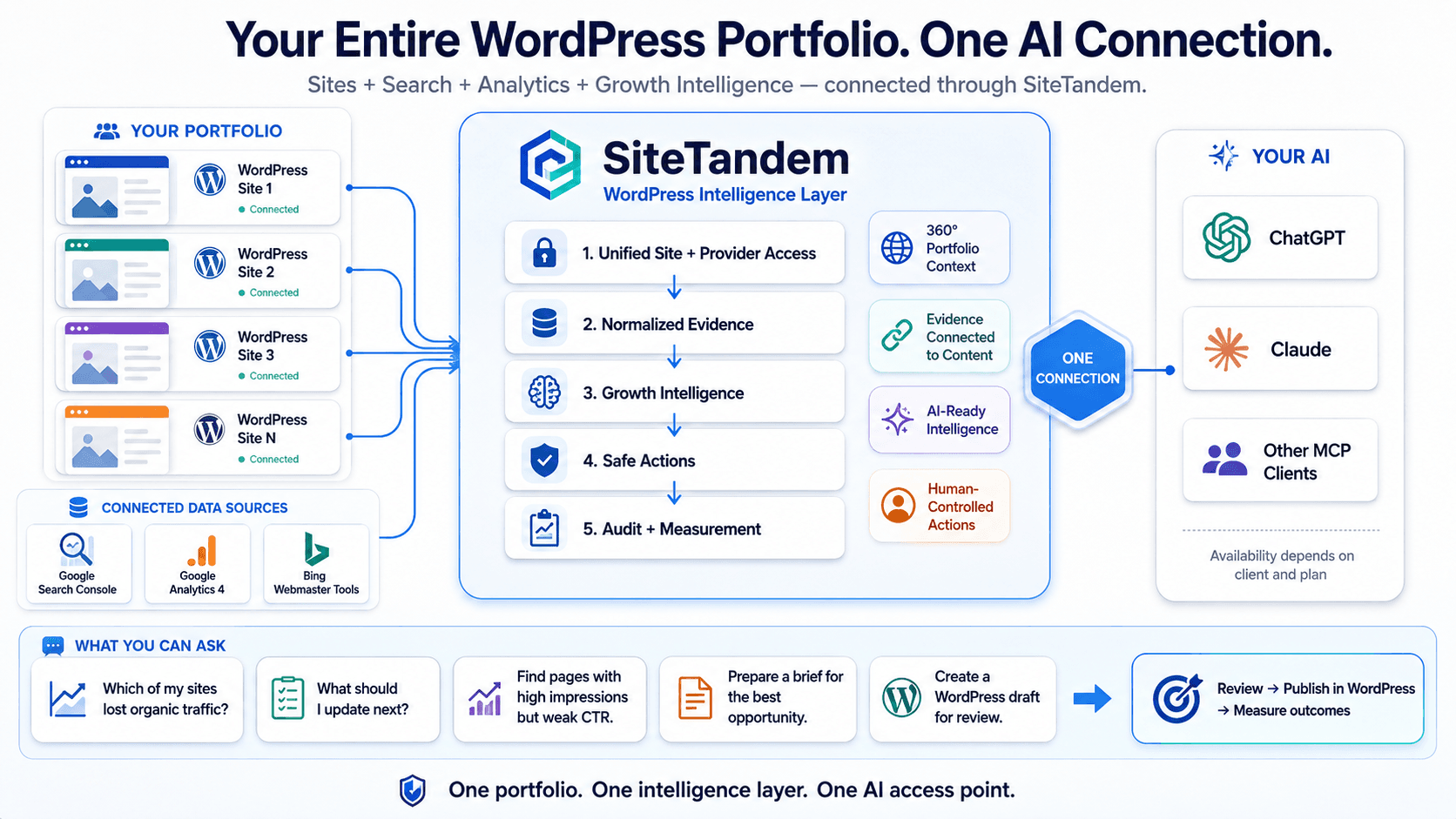
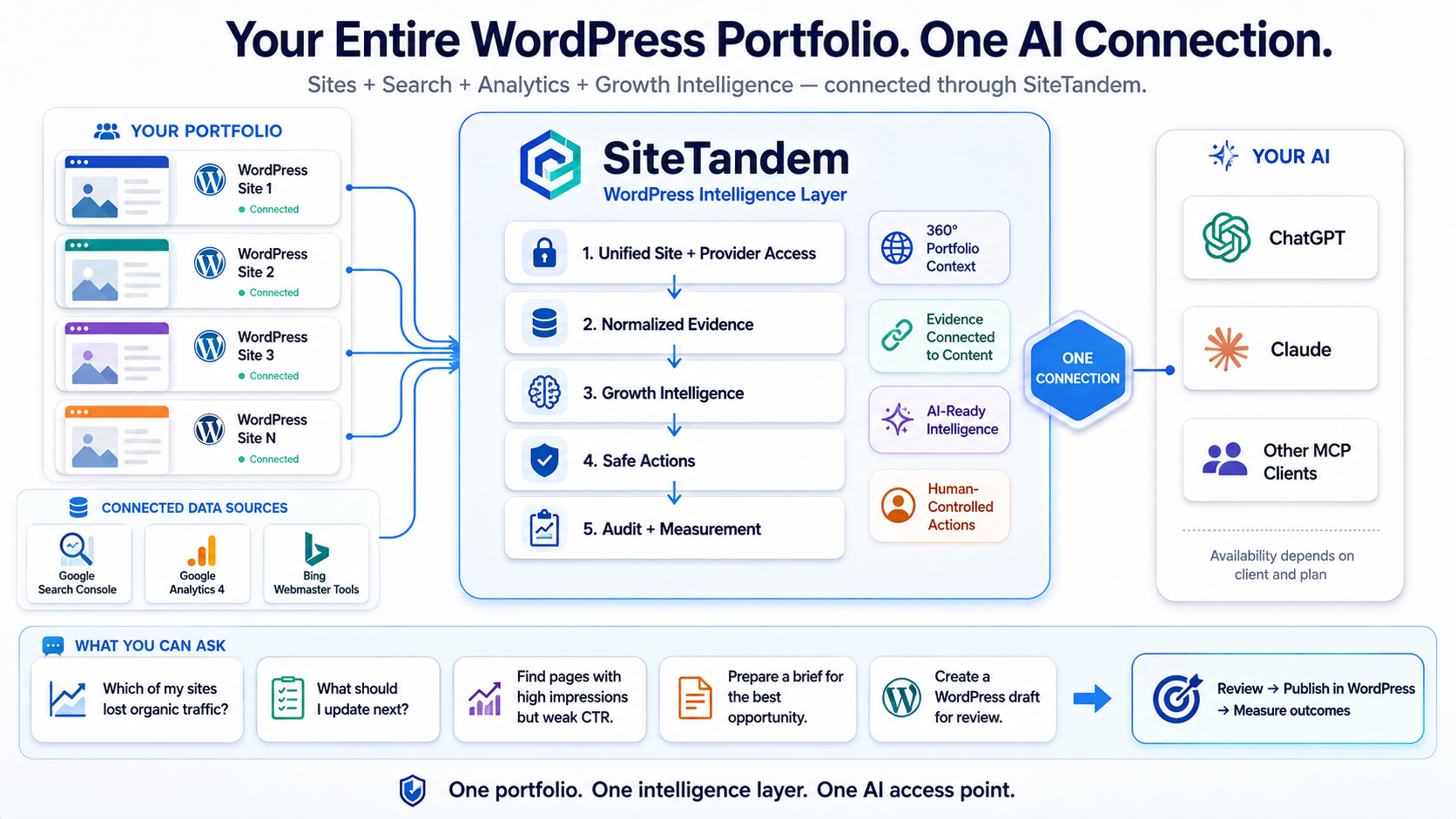
SiteTandem brings your authorized WordPress sites, search performance, analytics, growth intelligence and controlled action workflow into one governed layer for AI.

Portfolio intelligence overview
View full-size diagram
Diagram showing multiple WordPress sites, Search Console, GA4 and Bing feeding SiteTandem's intelligence layer, which connects to AI clients.

Sites Data Intelligence Action Measurement

Your website data lives in different worlds.

WordPress knows your content

Posts, pages, drafts, metadata and site state live inside each site.

Search and analytics know performance

Search Console, Analytics and Bing each describe a different part of what users and search engines are doing.

AI needs the relationships

Better decisions require the right performance evidence to be mapped back to the right site and content.

SiteTandem is the layer that connects them.

Why not just use a WordPress MCP or analytics MCP?

Those tools can solve useful parts of the problem. SiteTandem is designed around the complete WordPress portfolio workflow: content, performance evidence, intelligence and controlled action in the same context.
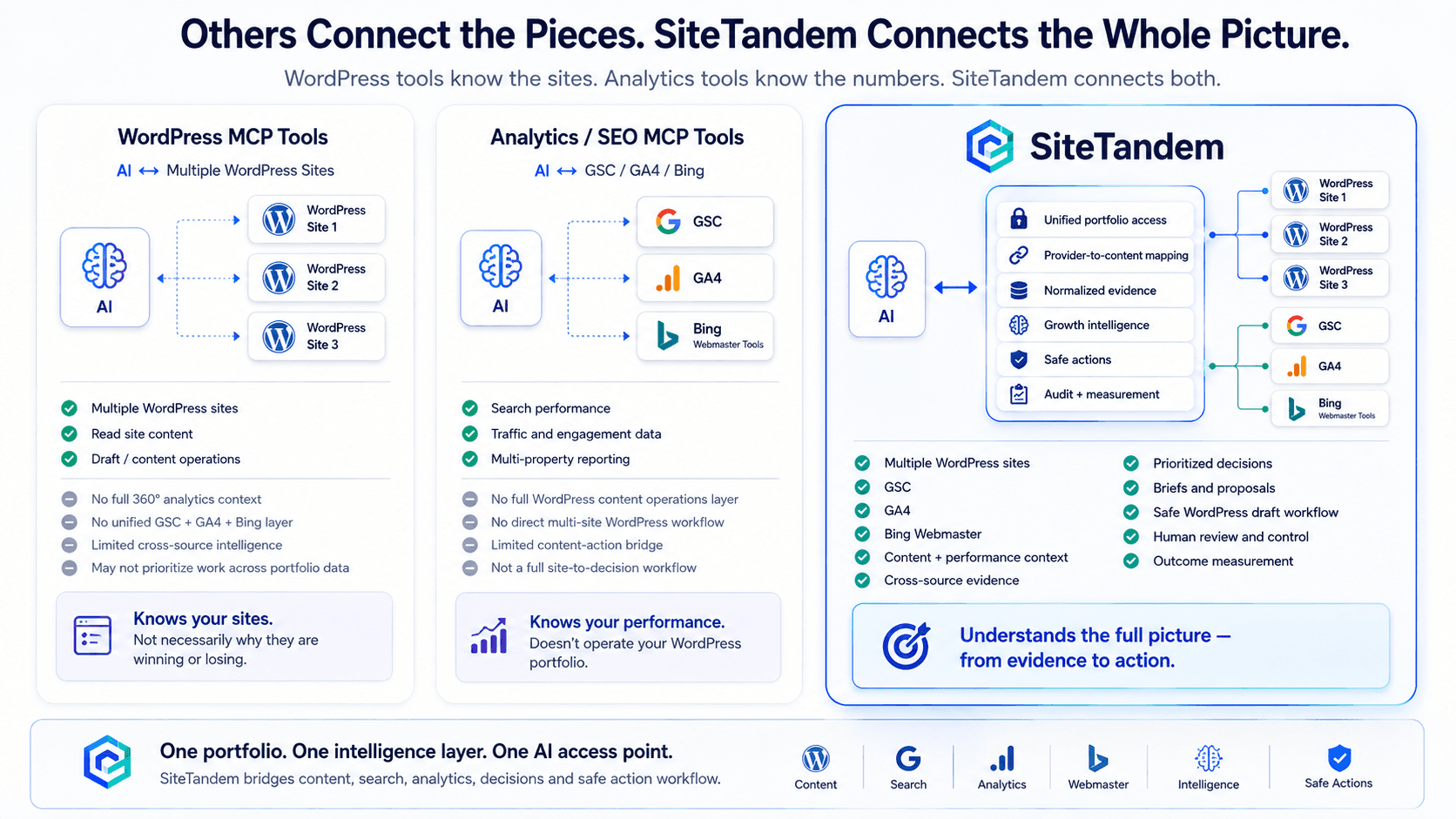
Complete workflow comparison
View full-size diagram
Comparison of typical WordPress MCP tools, analytics MCP tools and SiteTandem's combined content-to-evidence workflow.

Content + performance + intelligence + action belong in the same context.

How it works

From evidence to action — without losing control.

  1. 01

    Connect

    • WordPress
    • GSC
    • GA4
    • Bing
  2. 02

    Understand

    • Normalize evidence
    • Map performance to content
  3. 03

    Detect

    • Growth signals
    • Opportunities
    • Issues
  4. 04

    Decide

    • AI interpretation
    • Prioritization
    • Growth briefs
  5. 05

    Act safely

    • Drafts
    • Proposals
    • Human review
  6. 06

    Measure

    • Compare outcomes
    • Feed evidence into the next decision

Illustrative portfolio question

Stop opening dashboards. Ask the question.

SiteTandem gives your authorized AI client the site and evidence context needed to answer portfolio-level questions.

“What should I work on next across all my sites?”

Traffic decline

  • Organic performance changed
  • Supporting evidence available
  • Review recommended

CTR opportunity

  • Strong search visibility
  • Weak click-through signal
  • Content review candidate

Content refresh opportunity

  • Existing content identified
  • Performance context available
  • Brief can be prepared

What changed? · Which pages deserve attention? · What evidence supports this? · What should I update first? · Prepare a brief for this opportunity.

AI connections

Use the AI you already know.

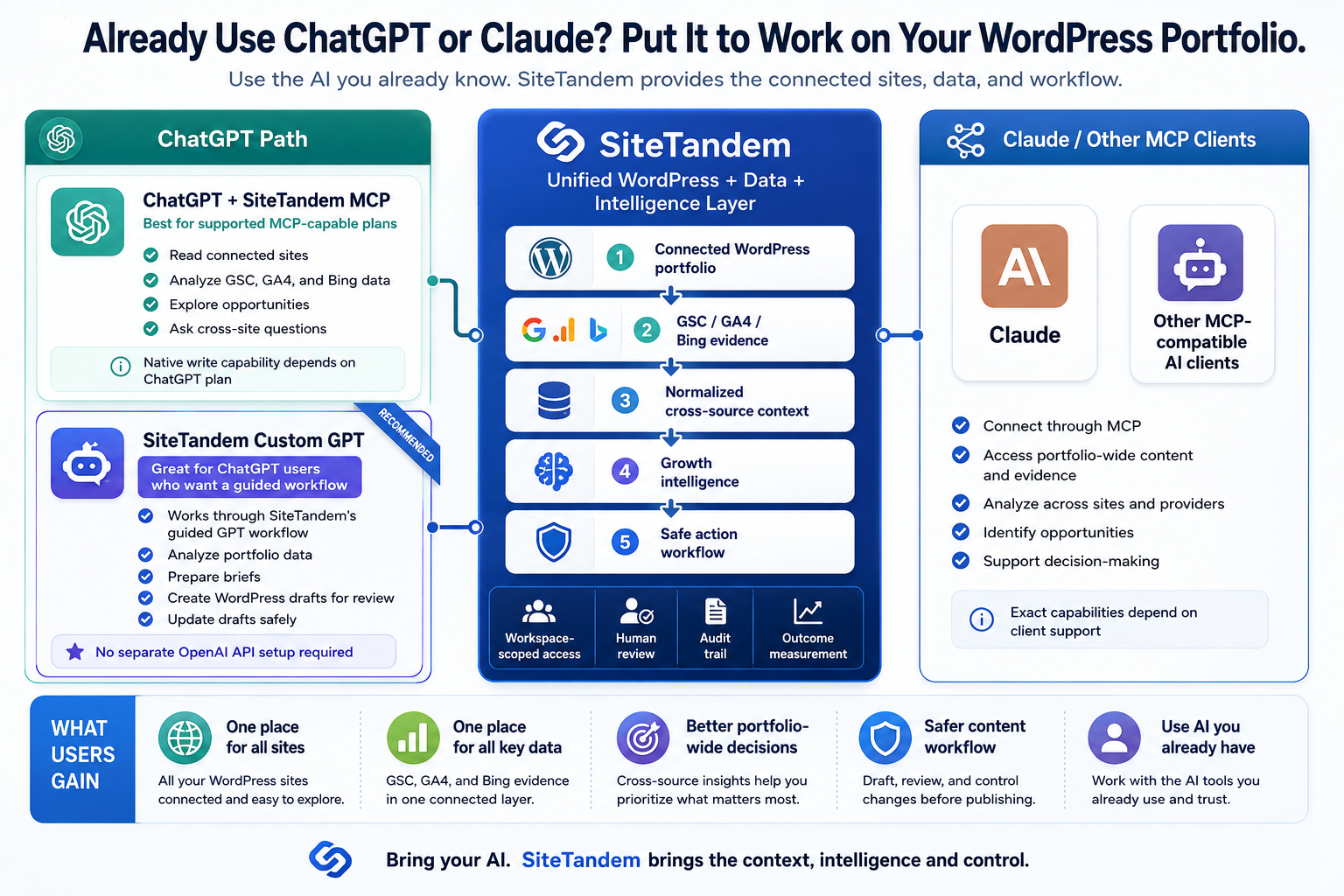
SiteTandem handles the website, evidence and control layer. Supported AI clients handle the conversation and interpretation.
AI connection paths
View full-size diagram
Diagram showing SiteTandem connection paths for ChatGPT workflows and compatible MCP clients.

ChatGPT

Native MCP capabilities depend on the current ChatGPT plan and workspace. The SiteTandem Custom GPT provides a separate guided Actions-based workflow.

Where authorized, the verified Custom GPT path can create or update bounded WordPress drafts. No separate OpenAI API setup is required for the SiteTandem Custom GPT workflow.

Supported MCP clients

OAuth-capable MCP clients can connect to SiteTandem according to their own MCP, authentication and tool-support capabilities.

Client availability and capabilities depend on the AI product, plan, workspace settings and current SiteTandem compatibility.

Security and human control

Powerful enough to help. Controlled enough to trust.

Workspace scoped

AI connections remain bounded to the authorized workspace, selected sites and granted permissions.

Evidence first

Provider facts, SiteTandem calculations and AI interpretation remain distinct.

Human controlled

SiteTandem does not give AI autonomous publish, schedule or delete authority.

Auditable

Important actions and operational decisions remain traceable through SiteTandem's existing audit boundaries.

AI can recommend. SiteTandem can prepare. You remain in control.

Provider data

Your data stays within the access you authorize.

  • SiteTandem requests read-only Google Search Console and Google Analytics 4 access.
  • You choose the Google account and properties to connect, then explicitly map properties to SiteTandem sites.
  • Reporting data is retrieved for user-requested reporting and growth analysis. Google provider access does not create, edit or delete data in your Google account.
  • Bing Webmaster Tools is a separate read-only evidence provider for authorized, explicitly mapped sites.
  • Provider access remains scoped to authorized properties or sites, and connections can be disconnected through Data Sources.
Read the Privacy Policy

Built for people managing more than one content decision at a time.

Multi-site publishers

Understand and prioritize work across a portfolio without manually piecing every site's data together.

SEO and content teams

Connect performance evidence directly to the WordPress content being analyzed.

Agencies and operators

Give authorized AI workflows governed access to the websites and evidence they are allowed to use.
Your sites already generate the data.

Put it to work.

Connect your WordPress portfolio and give supported AI workflows the context they need to make better evidence-backed decisions.

You control which sites and permissions each AI connection receives.